|
Size: 509
Comment:
|
Size: 1026
Comment:
|
| Deletions are marked like this. | Additions are marked like this. |
| Line 4: | Line 4: |
| === 時刻の基準を手で設定する === [[https://gwpy.github.io/docs/stable/timeseries/plot.html#plotting-multiple-timeseries-together|ここ]]を参照 {{{#!python ax = plot.gca() ax.set_epoch(1126259462) # GPS timeを入れる }}} |
|
| Line 6: | Line 12: |
| Line 9: | Line 13: |
| 他にも ''.add_state_segments()'' や ''.add_dataqualityflag()'' といった似たものがある。詳細は[[https://gwpy.github.io/docs/latest/plotter/api.html#gwpy.plotter.Plot.add_line|Plotting API]]を参照。 | |
| Line 12: | Line 16: |
| 他にも ''.add_state_segments()'' や ''.add_dataqualityflag()'' といった似たものがある。詳細は[[https://gwpy.github.io/docs/latest/plotter/api.html#gwpy.plotter.Plot.add_line|Plotting API]]を参照。 | == matplotlib色々 == [[https://qiita.com/simonritchie/items/da54ff0879ad8155f441|プロットの複雑なレイアウトはGridSpecが便利かも、という話]] [[https://bunseki-train.com/axvspan-and-axhspan/|matplotlibで一定区間に背景色をつける方法]] |
Plotの描画関連
時刻の基準を手で設定する
ここを参照
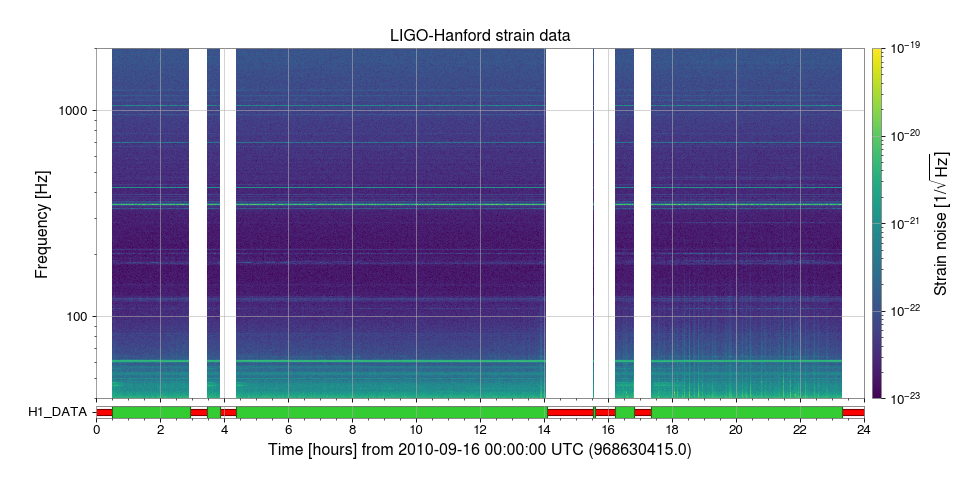
DQ Flagを添える
.add_segments_bar() を使う(ここを参照)。 他にも .add_state_segments() や .add_dataqualityflag() といった似たものがある。詳細はPlotting APIを参照。